
Introducing FormFlow: a headless form builder for Strapi v5
Build forms visually in Strapi, render them with your own frontend, and keep validation, spam controls, notifications, and submissions inside your CMS.
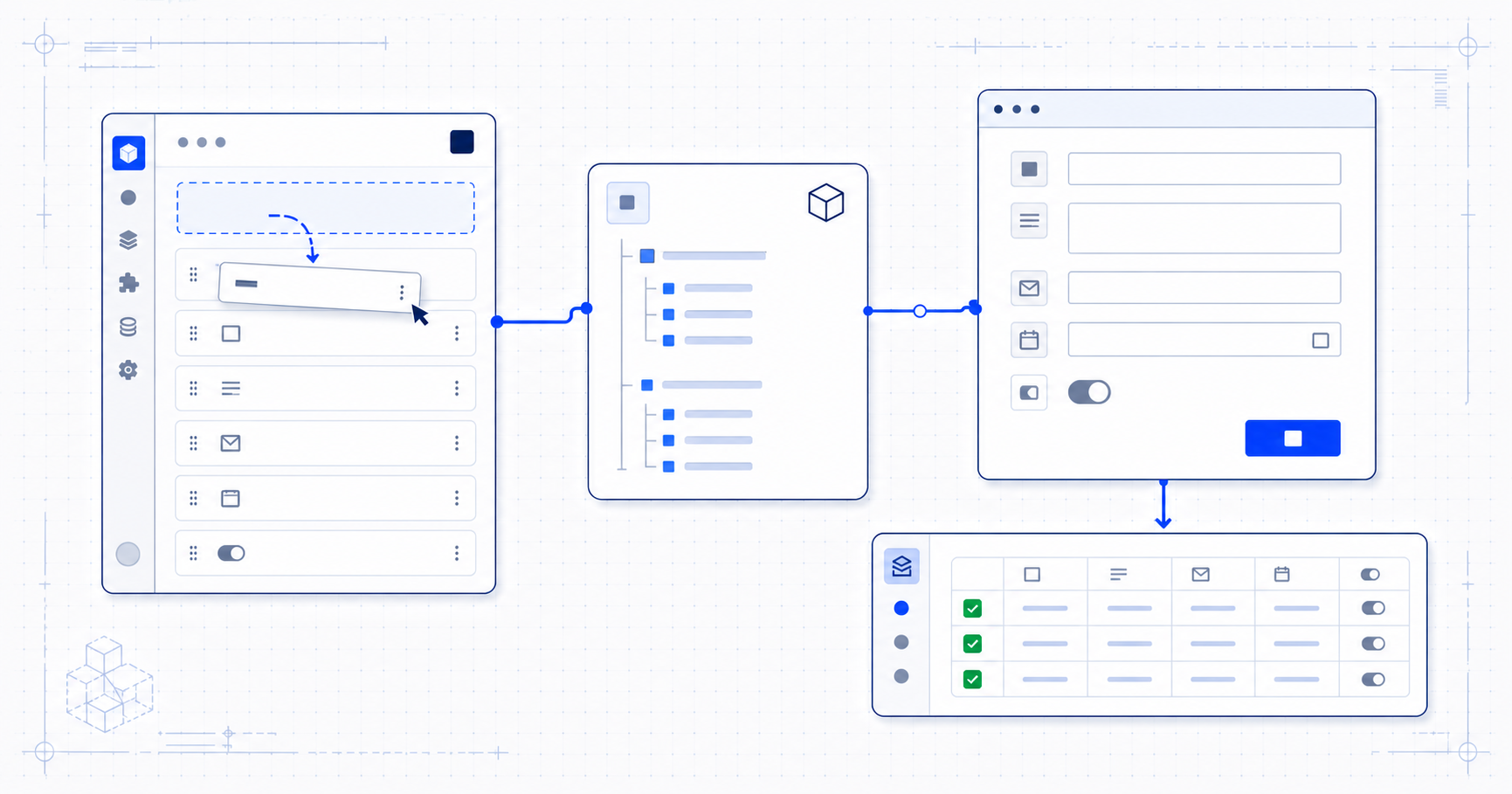
FormFlow is a visual, headless form builder for Strapi v5. Editors build forms in the Strapi admin. Your frontend fetches a sanitized JSON schema, renders it with your own components, and sends submissions back through a REST API. The form definitions and submitted data stay in your Strapi project.
A basic contact form is easy to hard-code. A form system is not. Once a project needs file uploads, validation, conditional fields, spam controls, notifications, submission statuses, exports and permissions, the “small form” has become a backend feature with its own admin interface.
FormFlow packages that work into one Strapi plugin without taking ownership of your frontend.
Build the form where your editors already work
FormFlow adds a form builder to the Strapi admin. An editor can create a form, add and reorder fields, configure validation, change the success message and review submissions without asking for a new frontend deployment.
The field registry covers 26 field and layout types:
- Text, textarea, email, number, phone, URL and password
- Select, radio, checkbox and boolean controls
- Date, time and datetime
- File upload, hidden values, signature, rating, address, rich text, calculated values, payment and consent
- Heading, paragraph and divider layout elements
Fields can carry labels, descriptions, placeholders, defaults, options, validation rules and width settings. FormFlow also supports conditional visibility and multi-step layouts when the workflow needs more than one screen.
Not every project needs every capability. The point is to keep the form model in one place instead of recreating it across a content type, custom controller, admin page and frontend component.
Render data, not a vendor widget
The public API exposes an active form by slug:
GET /api/formflow/forms/:slugThe response contains the form title, fields and public settings. Server-only values—such as captcha secrets—are removed before the schema leaves Strapi.
Your frontend can then render the schema however it wants. A design-system component, a Tailwind form, a native mobile screen and a plain HTML page can all consume the same form definition.
There is no iframe and no required stylesheet.
The official SDKs provide a typed client and renderless bindings:
# Framework-agnostic client and form engine
npm install @formflowjs/core

# React adapter
npm install @formflowjs/react

# Vue adapter
npm install @formflowjs/vue
The React and Vue packages handle state, validation, conditional visibility, multi-step navigation, file uploads and accessible prop wiring. They still leave every element and CSS rule to the application.
If an SDK is unnecessary, use fetch directly.
Keep submissions in Strapi
A frontend submits a flat map of field names to the public endpoint:
POST /api/formflow/forms/:slug/submit
Content-Type: application/json
{
"name": "Ada Lovelace",
"email": "ada@example.com",
"message": "Hello from FormFlow"
}File fields use multipart/form-data; JSON remains the simple path for forms
without uploads.
Before FormFlow stores a final submission, the server evaluates the active form schema again. Required fields, field-specific validation, conditional visibility and file rules are enforced on the server rather than trusted to the browser.
Accepted submissions appear in the Strapi admin inbox with their data, metadata and status. Teams can mark entries as read, processed, archived or spam, and export the data when it needs to move elsewhere.
This keeps the submission next to the rest of the project's operational data. It does not pass through a separate hosted form service first.
Production forms need more than validation
FormFlow includes the surrounding work that usually accumulates after a form goes live:
- Honeypot, rate limiting and captcha controls
- Email and Telegram notifications
- Webhooks and service integrations
- CSV, JSON, spreadsheet and PDF export paths
- Save and resume for longer forms
- Views, starts, completions and drop-off analytics
- Localized form content
- Approval workflows
- Retention, IP anonymization and subject-data workflows
- Strapi admin RBAC for forms, submissions, exports and settings
Capability availability depends on the active FormFlow license. The free core includes unlimited forms and submissions, standard and layout fields, file uploads, validation, the submission inbox, CSV/JSON export, basic spam protection, email notifications, RBAC, the public REST API and SDK compatibility.
Install FormFlow
Install the plugin in a Strapi v5 project:
npm install @formflowjs/strapi-plugin-formflowEnable it in config/plugins.ts:
export default {
  formflow: {
    enabled: true,
  },
};
Rebuild and start Strapi:
npm run build
npm run develop
Open FormFlow from the Strapi admin sidebar, create a form and note its slug. Fetch it from a frontend with the framework-agnostic client:
import { createFormFlowClient } from "@formflowjs/core";

const client = createFormFlowClient({
  baseUrl: "https://cms.example.com",
});

const schema = await client.getForm("contact");
Or inspect the response directly:
curl https://cms.example.com/api/formflow/forms/contactWhy FormFlow is open-core
The free core is intended to be useful in production, not a time-limited demo. It is MIT-licensed and does not meter forms or submissions.
FormFlow also contains source-available code under server/src/ee/ and
admin/src/ee/. Those files power capabilities licensed separately under the
FormFlow EE License. The distinction is explicit in the repository and package
license files.
This model keeps the basic form infrastructure accessible while funding the ongoing work required to maintain a Strapi plugin across releases.
Try it on a real form
The useful test is not whether the builder opens. Build one form your project actually needs, render it with your existing components, submit a valid and an invalid response, then review both paths in Strapi.
If the current contract does not fit your frontend or submission workflow, open an issue with the concrete use case. Early implementation feedback is more useful than a generic feature request.
Keep reading

The backend hiding behind a simple website form
A website form needs validation, spam protection, storage and review. See how a Strapi form backend separates editor control from your frontend and data flows.
· 8 min read
How to build a headless form with Strapi v5 and React
Build a React contact form with Strapi v5 and FormFlow. Fetch a public schema, render your own inputs, validate submissions, and store the responses in Strapi.
· 9 min read
Send Telegram notifications for Strapi form submissions
Send a rich Telegram message to a chat, group, or channel every time someone submits a Strapi form — using your own bot, with no webhook or server to run.
· 9 min read